Link in bio and SEO
Is a link in bio page bad for SEO?
We make Portage, so we have a stake in this. Here’s what search engines see on a link page, and how to check yours in a few seconds.
Every Portage page sends your name, bio and links as plain HTML, so search engines can read them straight away.
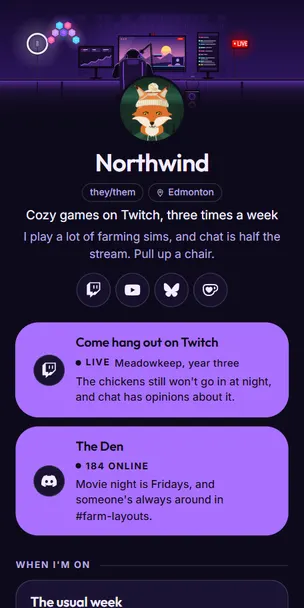
<title>Northwind (example page)</title>
<meta name="description"
  content="An example Portage page. I play a lot of…">
<h1>Northwind</h1>
"@type": "ProfilePage"
"mainEntity": { "@type": "Person",
  "name": "Northwind" }

Search engines need to read your page without JavaScript
If your page arrives as finished HTML, with your name, your bio and your link titles already in it, search engines treat it like any other web page. It can show up when people search your name, and it looks right when someone shares the link. If it arrives as an empty box that fills itself in with JavaScript, anything that doesn’t run the script only sees the page title.
Google can run JavaScript, but it does that later, in a separate step. A page that already has your words in it doesn’t have to wait.
You can’t tell the two kinds apart by looking, but you can check in a few seconds.

Check your own link page
You don’t need to install anything, and it works on any page, this one included.
- Open your link page in a browser.A computer is easiest, because iPhones can’t show you a page’s source.
- View the page source.On a computer, press Ctrl+U, or Cmd+Option+U on a Mac. In Chrome on Android, type
view-source:in front of the address. Don’t use the inspector, because it shows the page after JavaScript has already filled it in. - Search that source for your own name.Then for one of your link titles, and for a sentence from your bio.
- Look at what you found.If your words are there as plain text, search engines can read them too. If all you see is script tags and an empty box, they can’t.

What a page sends before any JavaScript runs
portage.camp/@northwind
<body>
  <h1>Northwind</h1>
  <p>I play a lot of…</p>
<a href="…">Come hang out…</a>- Your name in the page
- Yes, as the main heading
- Works without JavaScript
- Yes
<!doctype html>
<html>
<head>
  <title>@yourname</title>
</head>
<body>
  <div id="root"></div>
  <script src="/a.js"></script>
</body>
</html>
Before the script runs, the only text here is the page title. Everything else shows up later in the browser, and a search engine only sees it if it runs the script.

Four things to check on any link page
Try them on your current page and on this one. Each takes about a minute.
Your name, as text
Open your link page and view the source. Then search that source for your own name.
On Portage: It’s all there in the HTML, and the whole page is small enough to load fast on a phone.
If your name isn’t in the source, search engines and link previews have to guess what the page is about, and it’s much less likely to come up when people search for you.
A line about you
In that same source, find the line that starts <meta name="description".
On Portage: The description you wrote, or your bio if you haven’t written one.
Search results and link previews show this line, so it should be about you.
The page, working
Turn JavaScript off in your browser and reload the page.
On Portage: Your page still shows up and your links still work. The live badge and the Discord online count need JavaScript, so they just won’t appear.
It’s a good stand-in for how your page does on a slow connection or in an app’s built-in browser.
A free way out
Ask what happens to your email list, your click numbers and your page if you leave.
On Portage: You can download your email list, your stats and your whole page whenever you like, for free.
Your email list is yours, so you should be able to take it with you.

When you need more than a link page
It won’t replace a website.
A link page is one screen of links. If you need several pages, a shop or anything people browse around in, you need a proper website, and your link page can point to it. We build websites too.
It’ll mostly come up for your name.
A page about you ranks for your name. It won’t rank for what you do, like “Edmonton wedding photographer”, because there isn’t enough on it. That takes a website.
Most visits will come from your bio.
Most people will reach your page by tapping the link in your bio. Search matters most when something changes, like when you switch platforms or lose an account and people go looking for you.
A shared domain has limits.
Your page lives on portage.camp with everyone else’s, and search engines partly judge a page by the site it’s on. Your own domain doesn’t have that limit. Portage can’t use custom domains yet, but when it can, it’ll be free.
Other things people ask
- Does Google index link in bio pages?
- Yes, if the page can be indexed and has something on it worth finding. A page with your words already in its HTML is the easiest kind to index.
- How do I check whether search engines can read my link page?
- Open your page, view the source, and search it for your own name. If your name, your bio and your link titles are there as text, search engines can read them. If it’s mostly script tags and an empty box, they can’t. It only takes a few seconds, and you don’t need any tools.
- Does a link in bio page pass link equity to the sites it points at?
- It depends on the rel attribute on each link, which you can see in the page source. On a Portage page, your links are marked ugc and nofollow, which tells search engines not to count them as a vote for the sites they point to. Your profile links also carry rel="me", which tells other sites those accounts are yours.
- Should I use a link in bio page instead of a website?
- It depends on what you need. A link page is great if you don’t have a site yet, or as a hub that points to the one you have. If you need several pages, a shop or bookings, get a website.
- Does Portage use AI?
- No. Nothing on your page is written or chosen by AI, and we don’t use your page to train anything. We ask AI companies not to either.

Make a page search engines can read
Every Portage page sends your name, bio and links as plain HTML, and every feature is free. Pick your handle and you’re most of the way there.
Want to see one first? Look through the example pages.