




























































































My viewers are in every time zone
Set your schedule once in your own time. Each viewer sees it in theirs, and can add it to their calendar.
Portage for vtubers
A live badge lights while you’re on, and a countdown runs to your debut or your anniversary. Credits for your model and art sit right on the page.
A live badge lights while you’re on, and a countdown runs to your debut or your anniversary.
Pick a feature to see it on the page

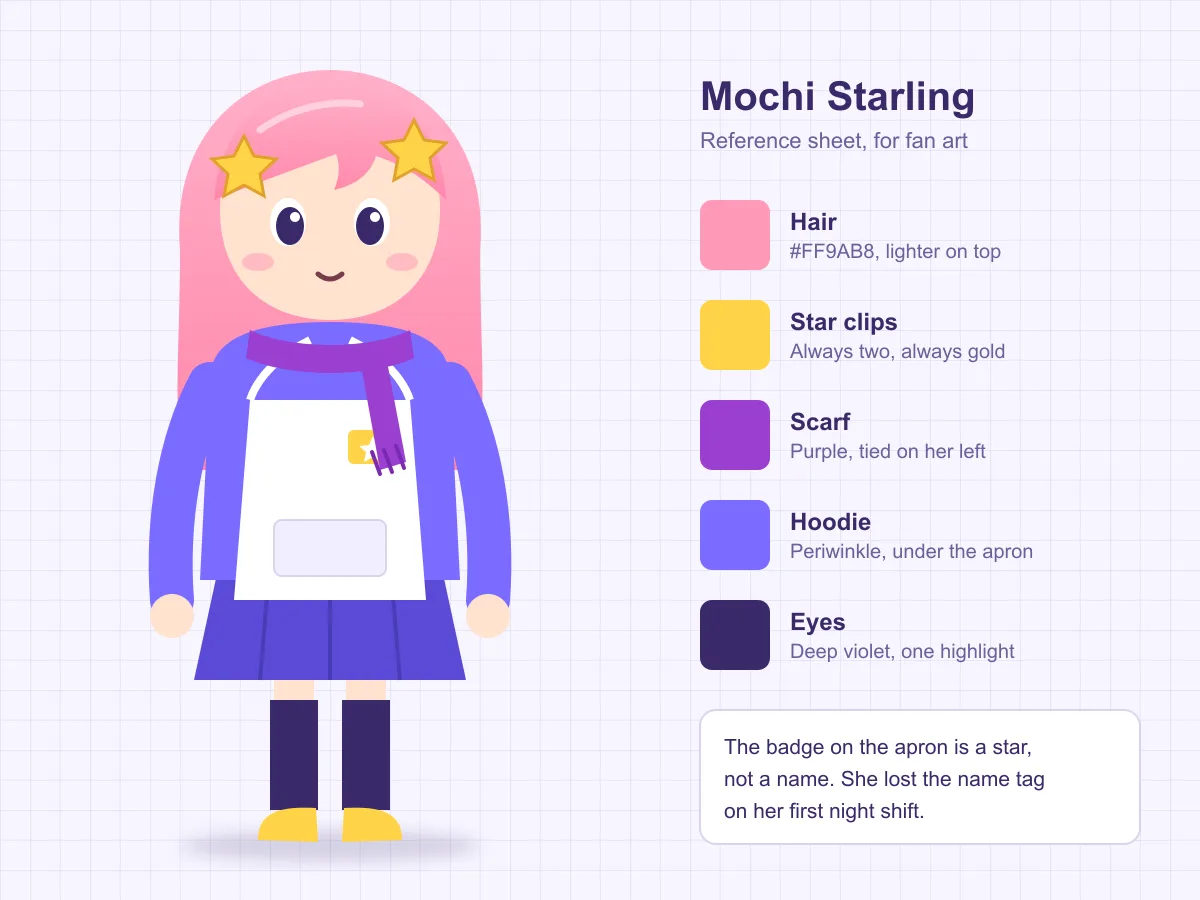
Mochi Starling
she/her
A star that fell into a convenience store. VTuber, debuting soon
Cozy games and karaoke. I can’t wait to meet you.
Debut stream inExample
The watch party in the Discord opens ten minutes early
Debut night, in order
1. The model reveal, with the lights off 2. The lore slideshow (nine slides, I promise) 3. Your questions from the Discord 4. One karaoke song, picked by chat
After the debut
From the week after, in your own time zone
Times are local to Toronto.
Before the debut
Yes. The replay goes up on YouTube the next day, and clips are welcome.
Please do. Tag it #starlingart and I’ll show it on stream with your name, unless you’d rather I didn’t. The reference sheet has every colour.
Clip anything else, but please leave the karaoke out. The songs belong to other people, and those clips get taken down.
I was a star until I fell through the roof of a convenience store at 3 AM. Now I work the night shift and stream when it’s quiet. The slideshow has the rest.
Credits
Art by Pocket Fern Rigging by Nebby Emotes by Clover Snail Thank you, all three.
One email on debut day
Just the one, an hour before I go live
portage.camp › @mochistarling
Mochi Starling (example page)
An example Portage page. Cozy games and karaoke. I can’t wait to meet you.
Tap the address to open Mochi Starling’s page and try it.
Viewers can add your whole schedule to their calendar.
Put in your usual stream times, and mark nights off.
Add your Twitch channel, and your page shows when you’re live.
Point it at your debut, or your next big stream.
Mochi Starling is about to debut, and Natsu streams from somewhere between Osaka and Vancouver. Starfall is three VTubers with one manager. We made them all up, avatars included.Made up, avatars and all. Start from any of them.
Mochi Starling, an example: @mochistarling
A new VTuber counting down to her debut, with her schedule in your own time and her model’s credits.
Counts down to her debut stream
Natsu Tanuki, an example: @natsutanuki
A tanuki who streams in English and Japanese, with the schedule in both and a live badge on her channel.
A two-language week, shown in your time
Starfall, an example: @starfallunit
A group of three run by one manager, with a collab night, each member’s page and a card for business enquiries.
All three members’ streams in one week
Set your schedule once in your own time. Each viewer sees it in theirs, and can add it to their calendar.
Add your Twitch channel and a live badge lights while you’re streaming, then goes out when you stop.
Count down to it on your page, and change it to your anniversary or your next big stream afterwards.
Count down to it on your page, and change it to your anniversary or your next big stream afterwards.
Mark them on your schedule and the page says so, then fills back in by itself.
Add your invite and your page shows how many people are online in it right now.
Name who drew your model, who rigged it and who made your emotes in a note, each linked to their own page.
Your page can be your character from the first line to the last.
How each of these works:
When we improve how search engines and AI answer engines read pages, yours gets the change by itself.
When we improve how search engines and AI answer engines read pages, yours gets the change by itself.
Nobody can promise a place in search results or a mention in an AI answer, so we don’t. What we can do is make your page easy to read and accurate, and keep it that way.
Add it to your bio and your stream’s end screen.
Every page feature is free. See what costs money
Already have a link page somewhere else? Bring your page over
Want a stream kit that matches your page? See the streamer stream kit or ask us here
Creators and streamers
Performers and makers
Businesses and services
Communities, teams and work
You can read more about pricing or how the checks work.